

Who is PLCflow Sim for?
Test your program as you develop it
For controls engineers and integrators. Import the L5X export and test any sequence of your code, without a PLC.
Testing PLC programs without hardwareEducationLearn and grow with programs you can run free
For students and instructors. Every example runs in a browser tab, with no install and no account, on PC, Mac or Chromebook.
PLC training simulatorHMI and SCADA testingConnect your SCADA screens to logic before the PLC exists
For HMI and SCADA developers. Connect the simulator over OPC UA and drive your HMI program. Your screens update as the live with the logic.
Testing HMI and SCADA without a PLCMost logic meets its first real test at commissioning.
Bugs that you could have found are discovered while the client is waiting, and precious commissioning time runs out. It's the most expensive place to find a timer that doesn't reset or an interlock that holds up your process. A hardware test bench is rarely free when you need it, and reviewing your rungs only gets you so far.
We built PLCflow Sim so every routine can be run from the day it is written.
How it works
- 01
Import your logic
Drop an .L5X export or Neutral Text on the Import screen, paste from the clipboard, or open an empty program and start typing.
- 02
Load it and Run
The scan engine executes your routines in order, one scan after another, at the scan period of your plan. Rungs show power flow as they go true.
- 03
Set, change, save
Toggle inputs and type in values from the tag list, push edits into the running session, and save a named version once the logic behaves.
Tested against 1000-line PLC programs and all code was successfully imported and run, UDTs, AOIs and aliases included. Available instructions and usage
Three views of the same program
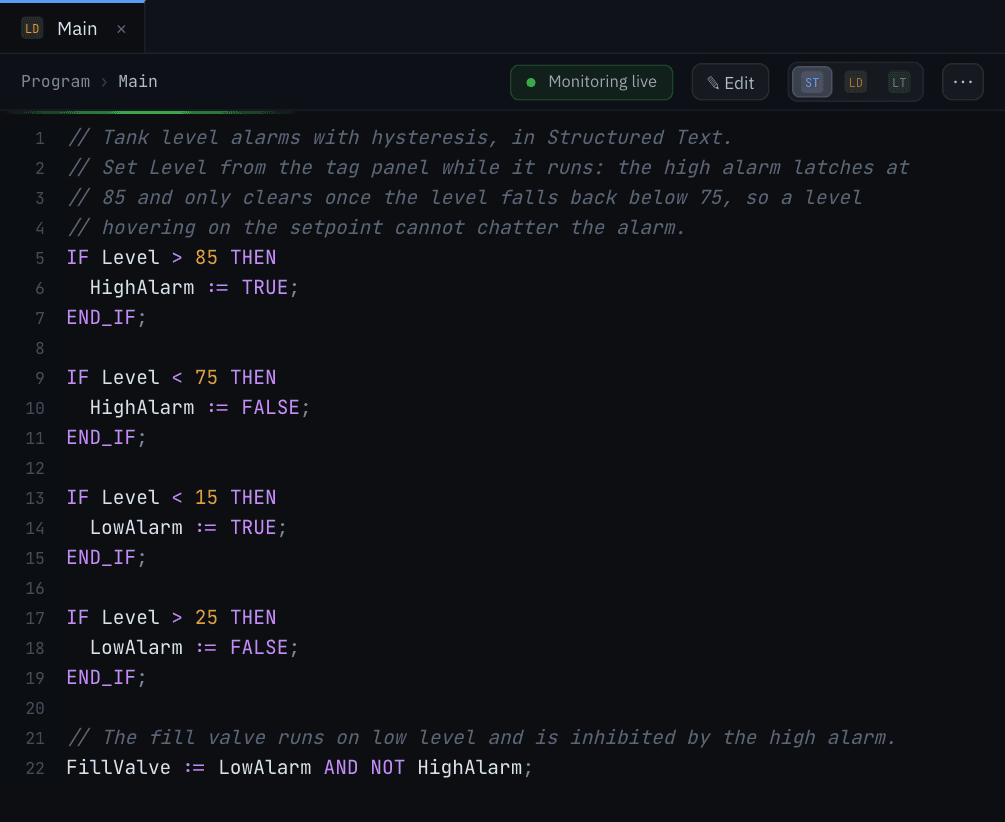
Read the same program as ladder, Structured Text or Neutral Text, and switch between them at any point. Edit either text form, press Apply, and the ladder is redrawn. The tag list beside it shows every value as the program scans.
- Ladder with energized power flow on every rung
- Structured Text, shown exactly as you wrote it
- Neutral Text for fast keyboard entry and paste
Sessions keep scanning after you close the tab
A live slot is one running simulation. It runs on our servers, so it keeps scanning for 30 minutes after you close the tab, and for as long as its OPC UA endpoint is exposed. Starting another one leaves the ones already running alone.
- Run any saved version in an empty slot, next to the one that is already live
- Point an HMI or SCADA client at a slot's OPC UA endpoint
- Scan period, scan time and overruns in the status bar
What you get on every run
Deterministic scan engine
Routines execute in a fixed order on every scan, so the same logic and inputs give the same result on every run.
Live tags you can set
Filter the tag list, watch timers accumulate, and set an input to see how the rest of the routine responds.
Edit while it runs
Change the program during a live session and push it in. The session keeps its slot and its OPC UA endpoint; tags and timers start again.
Named versions
Save a version at any point. A project keeps up to 25 of them, and any version can be loaded back into a slot.
PLC examples you can run now
Each one is a short program built around one idea. Open it and press Run. Examples don't need an account.
Motor start/stop
Ladder (NT)A latching start/stop station. Click Start once and the seal-in branch holds the motor on through its own contact until Stop breaks the rung.
Conveyor with dwell
Ladder (NT)The belt runs, a 5-second timer gives it time to get up to speed, and only then does the ready lamp light. Watch the accumulator climb.
Tank level alarms
Structured TextLevel alarms with hysteresis, in Structured Text. Each alarm sets at one level and clears at another.
Traffic light sequencer
Structured TextThree chained timers cycle forever with no input. Press Run and watch it go.
Pump station (L5X)
L5X importAn L5X program export with lead/lag pumps, program-scope tags and a JSR'd alarm routine.
Pricing
Plans differ by how many live slots you can keep scanning at once. The examples are free for everyone and need no account.
Free
Learn the tool and try it on your own programs. Sessions scan for 25 minutes, then freeze until you resume.
Start freeStandard
RecommendedOne engineer, daily use. No session timer and 10 saved projects.
Choose StandardPro
Several lines or several clients. 10 live slots, each on its own version.
Choose ProIntegrator
For FAT prep across several systems at once: 25 live slots, a 5 ms scan floor and OPC UA endpoints with no time limit.
Choose IntegratorTest PLCflow output before it reaches a controller
PLCflow generates L5X logic from I/O lists and alarm spreadsheets. Export it, drop it on PLCflow Sim and press Run, and you can set its inputs and check its outputs before it goes into a project file.
Start with an example
Pick one of the 9 examples and press Run. There's nothing to install and you don't need an account.
Run an example