
One-shot ladder logic for a push-on, push-off button
A PLC scans its program many times while your finger is on a button. Without a one-shot, logic that should happen once per press happens on every one of those scans. This example uses ONS to turn a press into a single one-scan pulse, and uses that pulse to toggle a lamp.
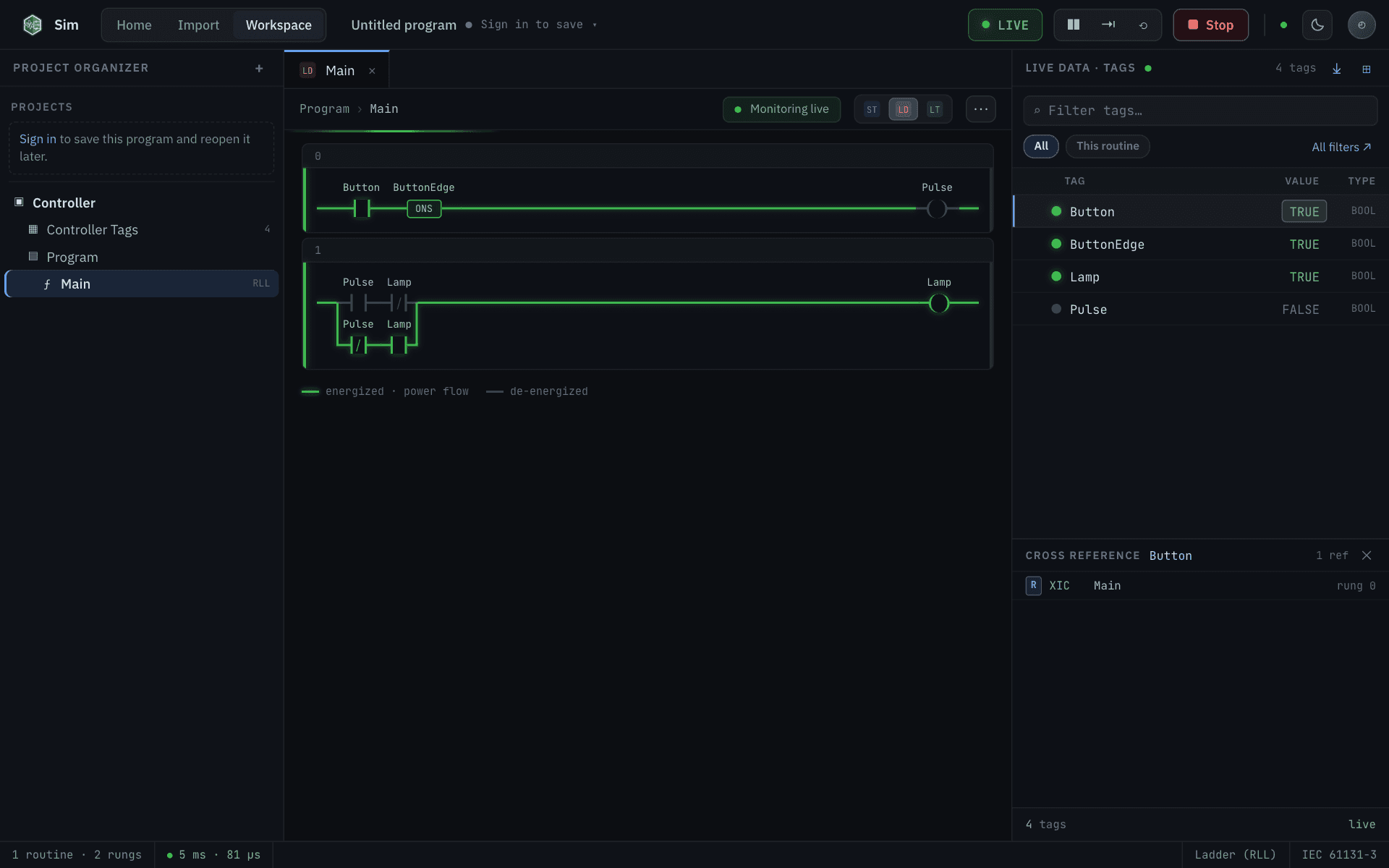
The program
XIC(Button)ONS(ButtonEdge)OTE(Pulse);
[XIC(Pulse)XIO(Lamp),XIO(Pulse)XIC(Lamp)]OTE(Lamp);
How it works
Rung 0 makes the pulse. ONS(ButtonEdge) passes power for exactly one scan when the rung leading into it goes from false to true. ButtonEdge is its storage bit: it remembers whether the rung was true on the last scan. So Pulse is on for one scan each time Button is pressed, and off for as long as the button is held after that.
Rung 1 toggles the lamp. The top branch is true when there is a pulse and the lamp is off, which turns it on. The bottom branch is true when there is no pulse and the lamp is on, which keeps it on. When a pulse arrives with the lamp already on, neither branch is true and the lamp goes off.
The rung reads Lamp before it writes it. The contacts see the value left by the scan before, and the coil at the end of the rung sets the new one. That is how one rung can flip its own output.
Take the one-shot out and the rung would flip the lamp on every scan the button is held. Where it ended up would be a matter of luck.
Try this
In the simulator, an input changes when you click it in the tag list: click once to turn it on and again to turn it off. To press a button, turn it on; to release it, turn it off; to pulse it, do both.
- Press Button and hold it. Lamp turns on and stays on.
- Release, then press again. Lamp turns off.
- Pause the program, turn Button on, and step one scan at a time. Pulse is on for the first step and off for the second.
Tags
| TAG | ROLE |
|---|---|
| Button | BOOL input. Push button. |
| ButtonEdge | BOOL. The one-shot's storage bit. |
| Pulse | BOOL. On for one scan per press. |
| Lamp | BOOL output. Changes state on each press. |
More examples
Motor start/stop
Ladder (NT)A latching start/stop station. Click Start once and the seal-in branch holds the motor on through its own contact until Stop breaks the rung.
Bottle counter
Ladder (NT)A photo-eye counts bottles into a case of six. Pulse the sensor and watch the count climb, then reset it for the next case.
Read more about the ladder logic simulator, or see all examples.