
OPC UA PLC simulator
Test your HMI before the PLC is available
Expose any running session as an OPC UA endpoint and connect your HMI or SCADA client to it. The logic keeps scanning on our servers, so screens, alarms and trends respond to running logic instead of static test values.
A running session becomes an opc.tcp:// endpoint your client can browse
- 01 Run
- 02 Expose
- 03 Connect your client
SLOT 1 · LIVE   Filler_Line_2 v4
OPC UA  opc.tcp://<your-endpoint>:4841
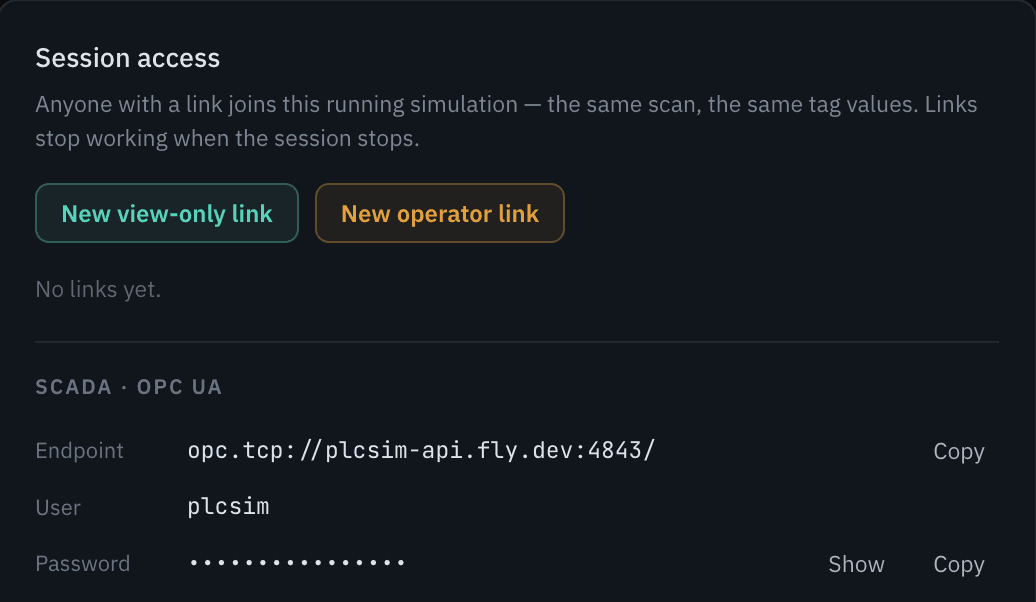
What your HMI or SCADA client gets
An endpoint it can browse
Your client browses and reads the session's tags over OPC UA. Each exposure has its own password.
Reads and writes
Your HMI reads live values and writes back into the running logic, aliases included.
Stays up when you close the tab
Sessions scan on our servers, so the endpoint stays up after you close the tab.
Exposed only when you say so
Nothing is exposed until you expose it. How long an endpoint stays up is set by your plan and shown in the app.
With and without a simulator
Without a simulator
- HMI screens tested against static tags or a borrowed controller
- Alarm logic first exercised on site
With PLCflow Sim
- Screens bound to a running program before the hardware arrives
- Alarms fire because the logic fired them
Who uses it this way
HMI developer
Builds screens in parallel with the PLC programmer, against the program as it stands.
SCADA integrator
Tests tag mapping before there is site access.
Trainer
Runs an HMI lab with no hardware on the bench.
Try it on an example
OPC UA endpoint questions
How long does an OPC UA endpoint stay up?
It depends on the plan: 25 minutes on Free (the length of the free session), 7 days on Standard, 30 days on Pro, and no time limit on Integrator. Endpoints at a time: 1 on Free, 1 on Standard, 3 on Pro, 5 on Integrator.
Is the endpoint protected?
Yes. Each exposure gets its own password, and the connection is signed and encrypted. Stopping the exposure and exposing again gives a fresh password.
Can I use the endpoint to control real equipment?
No. It is for test clients only.