
HMI and SCADA testing
Test HMI and SCADA screens against running logic
The HMI team usually waits for the PLC. Run the program in PLCflow Sim instead, expose the session over OPC UA and connect your HMI. Control it as you would with a PLC – screens, alarms and trends respond to the logic as it scans.
The situations
Screens before the panel is built
The situation. The PLC program exists, or most of it does. The hardware doesn't.
What you do. Run the program, expose it, and bind your screens to its tags now, under the names they have in the program.
Alarms
The situation. Alarm setpoints and messages usually get their first real test on site.
What you do. Change the level, pressure or fault tag from the tag list and watch the alarm raise and clear on your screen, with the deadband the logic gives it.
Operator training and demos
The situation. An operator session or a client demo, and no hardware on the bench.
What you do. Run the program in a slot, connect the HMI, and let people operate it. What they write from the screen lands in the running logic.
How to set up
- Run your program in a live slot.
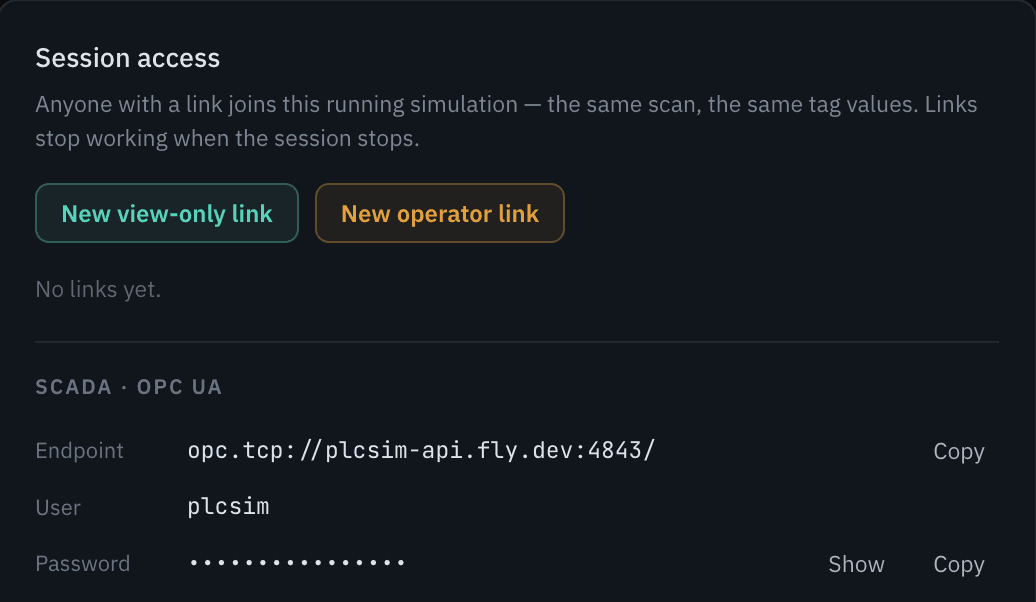
- Expose the session. You get an opc.tcp:// address, a username and a password for that exposure.
- In your client, add an OPC UA connection to that address with that username and password. Trust the server's certificate when asked.
- Browse the tags and bind them.
The app has a step-by-step guide for Ignition 8.1. Other OPC UA clients need the same three things: the address, that security mode, and the username and password.
What it can't tell you
Your screens are talking to simulated logic. Communication timing, your controller's own driver, I/O faults and device behaviour are not modelled, and the path to each tag is PLCflow Sim's, so expect to set the connection up again on site. An endpoint is for test clients only. Never connect it to anything that drives real equipment.
Which plan fits
It comes down to how long an endpoint has to stay up.
| Free | Standard | Pro | Integrator | |
|---|---|---|---|---|
| Endpoints at once | 1 | 1 | 3 | 5 |
| Each stays up | 25 minutes (the session) | 7 days | 30 days | no time limit |
Those are the longest an endpoint can stay up. Separately, an endpoint nobody has touched for 30 days is withdrawn, Integrator's included. You can expose the session again when you need it.
Examples to try
HMI and SCADA testing questions
Which HMI and SCADA software works?
Any OPC UA client that supports Basic256Sha256 / SignAndEncrypt with a username and password should connect. The in-app guide covers Ignition 8.1 step by step. If another client gives you trouble, let us know through the contact form.
Do my tag names stay the same?
Yes. The endpoint publishes the tags under the names they have in your program, aliases included. The path to them is PLCflow Sim's own, so the connection settings will differ from your controller's.
How is the endpoint protected?
Each exposure gets its own password, and the connection is signed and encrypted. Stopping the exposure and exposing again gives a fresh password.