
How the PLC simulator works
From your file to a running scan
PLCflow Sim converts your program to a vendor-neutral form built on IEC 61131-3 and runs it on a scan engine written in Rust. This page follows a program through it: what is converted, what one scan does, how fast it runs, and what you see while it does.
The path a program takes
Four stages, and only the first one is yours. The conversion happens once, when the program is imported or edited, not on every scan.
- 01
You bring the logic
An L5X export, Rockwell Neutral Text or Structured Text. Drop a file on the Import screen, paste it, or type into an empty program.
- 02
It is converted once
PLCflow Sim reads the program and converts it to its own vendor-neutral form, built on IEC 61131-3. The import report lists what came across and names anything it can't run yet.
- 03
The engine scans it
Press Run and a scan engine on our servers executes the converted program, one scan after another, at your plan's scan period.
- 04
You control it
Toggle an input or type in a value from the browser and the next scan runs with it. Rungs and tags update as they change. Push an edit into the running session, or save a version.
What happens in one scan
A scan is one pass through your logic. PLCflow Sim does the same things in the same order on every pass, which is what makes a rung's behaviour something you can reason about.
- 01
Programs run in schedule order
A controller export runs its programs in the order its tasks schedule them. A single routine or a pasted program is one program.
- 02
Rungs run top to bottom
Each routine is evaluated from its first rung to its last. A subroutine runs when a JSR calls it, at the rung that calls it.
- 03
Timers and counters update where they sit
A TON updates its accumulator and done bit on its own rung, so a rung below it sees the new done bit in the same scan and a rung above it sees it on the next.
- 04
Changes go out to your browser
When the scan ends, the tags that changed are sent to every view of the session, and to an OPC UA client if you've exposed one.
Then the next scan starts. On the first scan after a program is built, the first-scan bit S:FS is true for that scan only, as it is on a controller.
A value you set waits for the scan
Setting a tag from the tag list never lands part-way through a scan. It is applied between two scans, and the next one runs with it.
Timers measure real time
A 5-second TON takes 5 seconds at a 10 ms period and at a 100 ms period. The period decides how often the logic looks, not how fast time passes.
A math fault doesn't stop the scan
A divide by zero sets the overflow flag, S:V, and is recorded against the rung that caused it. The rest of the scan carries on.
Nothing is shared between sessions
Every running session has its own program, its own tags and its own timers. What one does can't reach another.
Written in Rust, and timed on every scan
The scan engine is written in Rust and compiled to native code. It has no garbage collector, so nothing pauses a scan part-way through to tidy memory.
The scan period examples run at when you haven't signed in.
The scan period with an account.
The scan period on the Integrator plan.
See it on your own program
Scan time depends on the program, so PLCflow Sim measures yours. The status bar shows the period and then what the last scan cost, such as 10 ms · 25 µs. Click it to open the scan monitor, which keeps the worst scan since the session started or was last reset.
When a program is too heavy for its period
It isn't stopped. The session spaces its scans four times their cost apart, counts the overruns and shows the period it is really running at. Timers still measure real time, so reactions get coarser but a timer doesn't run long.
Three views of one program
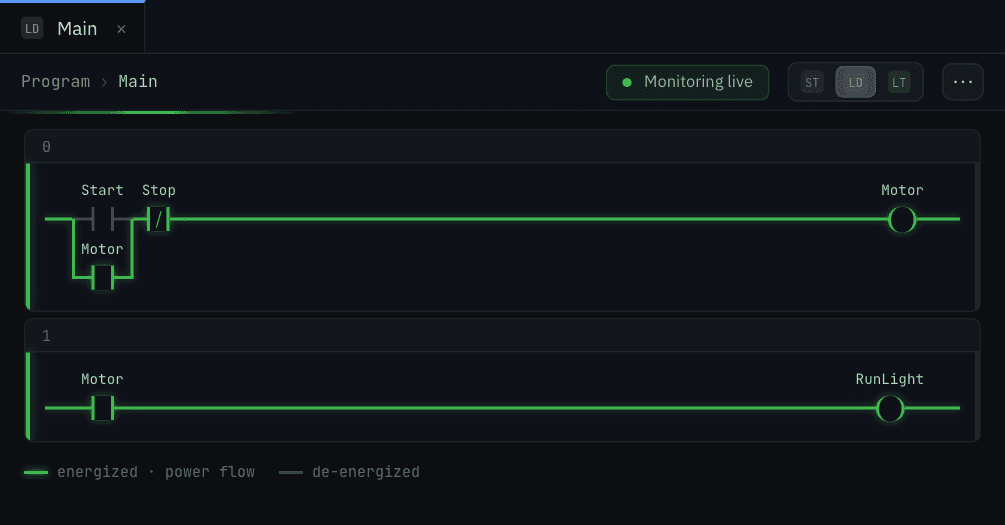
The engine runs one converted program, and you can read it three ways. Switch between them at any point, running or not.
- Ladder, with power flow drawn on every rung as it goes true
- Structured Text, shown exactly as you wrote it
- Neutral Text, for fast keyboard entry and paste
Every tag, live and settable
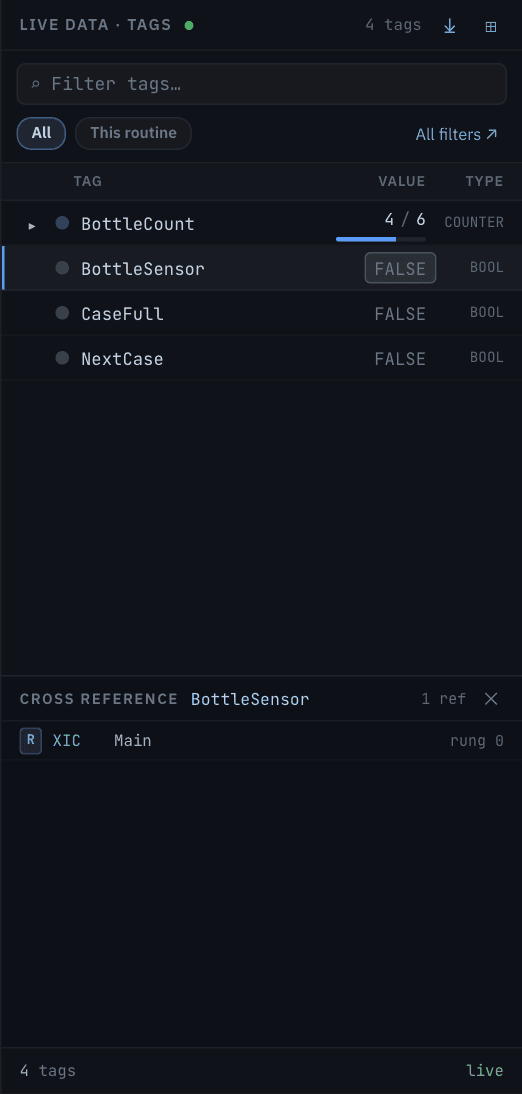
The tag list sits beside the program in every view. It shows each value as the program scans, and it is where you set the inputs and values the logic runs on.
- Click a BOOL to toggle it, or type a number into an analog tag
- Filter by name, or to the tags the open routine uses
- Select a tag to see every rung that reads or writes it
Four ways to start
Three formats for your own logic, and a set of examples for when you'd rather see it work first.
A routine, a program or a whole controller
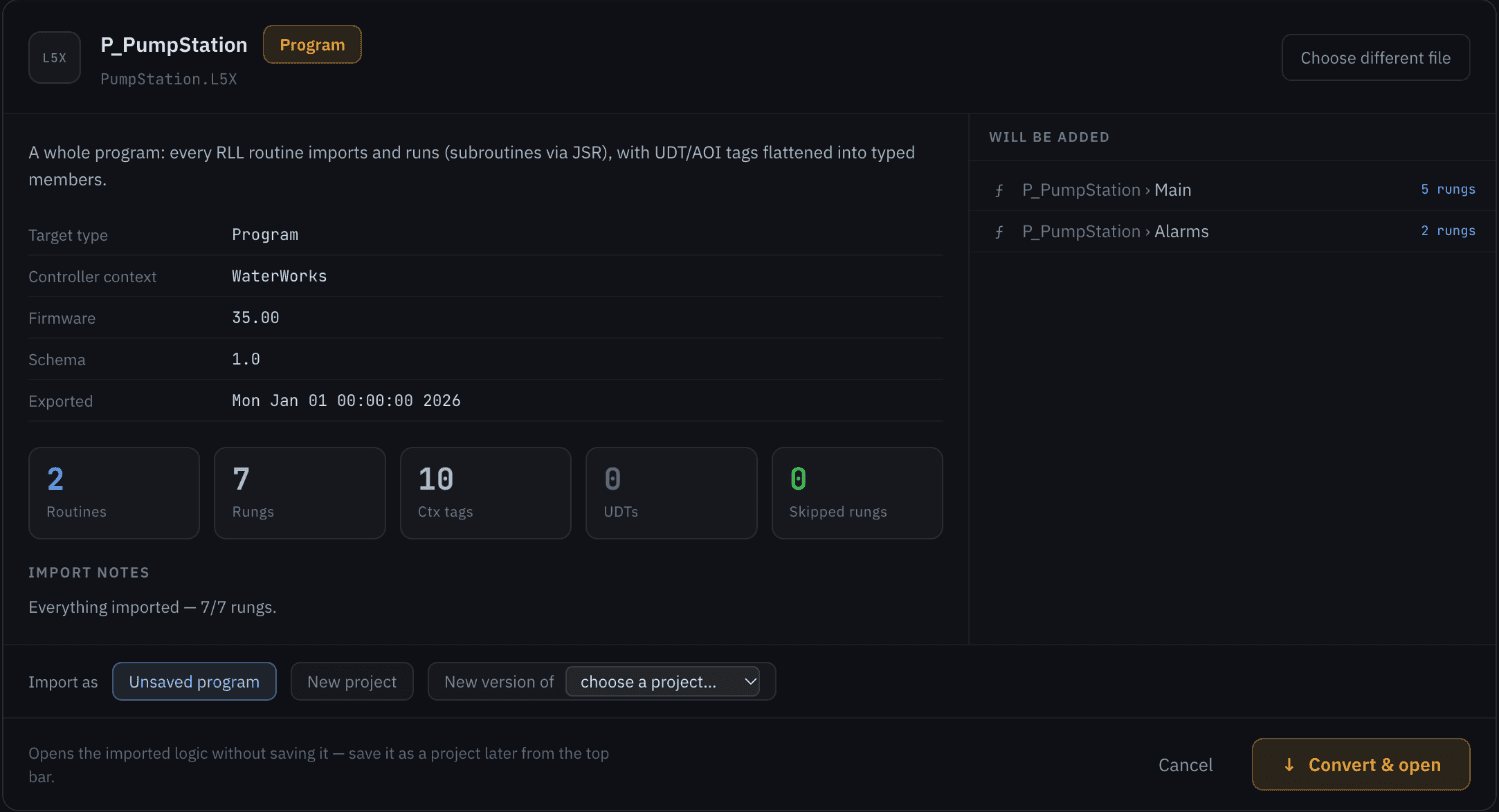
An export at any of the three scopes, with its tags, UDTs, AOIs and aliases. A controller export runs its scheduled programs in task order, once per scan.
Ladder as text
The exported text form of ladder, XIC(Start)OTE(Motor); with a semicolon closing each rung. Quick to type and quick to paste.
The native language
IEC 61131-3 Structured Text is the language PLCflow Sim is built around. Your source is kept and shown exactly as you wrote it, comments included.
9 programs ready to run
Each one is built around a single idea, such as a seal-in, a timer or a counter, and has a page here that explains what every rung does.
A session runs on our servers, not in your tab
Pressing Run starts a session in a live slot. The engine for it runs on our servers, so closing the tab doesn't stop the logic: it keeps scanning for 30 minutes, and for as long as it is exposed as an OPC UA endpoint.
Edit without stopping
Change a line during a live session and the new logic is loaded into the same session, the way a download reaches a controller. Timers and counters start again. An edit that doesn't build is refused, and the old logic keeps scanning.
Save versions as you go
Name a version once the logic behaves. A project keeps up to 25 versions, and any version can be run in its own slot beside the one that is live.
Connect an HMI or SCADA client
Expose a session as an OPC UA endpoint and your client reads and writes its tags while it scans.
Start with an example
Three good first ones: a seal-in, a timer, and level alarms in Structured Text. Each card opens a page that explains the program, with a button to run it. No account needed.
Motor start/stop
Ladder (NT)A latching start/stop station. Click Start once and the seal-in branch holds the motor on through its own contact until Stop breaks the rung.
Conveyor with dwell
Ladder (NT)The belt runs, a 5-second timer gives it time to get up to speed, and only then does the ready lamp light. Watch the accumulator climb.
Tank level alarms
Structured TextLevel alarms with hysteresis, in Structured Text. Each alarm sets at one level and clears at another.
What a simulation can't tell you
PLCflow Sim runs your logic, not your plant. It doesn't reproduce real I/O timing, hardware faults, network behaviour or safety functions, and it must never be connected to real equipment. It shows how the logic behaves. Commissioning still proves the system.
Questions about how it runs
Does the simulation run in my browser or on a server?
On our servers. Your browser shows the program and its values and sends what you set or edit. That is why a session keeps scanning for 30 minutes after you close the tab, and why an HMI can connect to it.
What does deterministic scan mean here?
Every scan evaluates the same programs, routines and rungs in the same order, one at a time. Nothing runs in parallel with a scan and nothing changes a tag in the middle of one, so a rung's result depends only on the logic and the tag values going in.
How fast can it scan?
Your plan sets the period. With an account it is 10 ms, or 5 ms on Integrator. Examples run without an account at 100 ms. The scan itself usually takes far less than the period, and the status bar shows how long.
What happens if my program takes longer than the scan period?
It keeps running. The session runs each scan four times its cost apart instead of at its usual period, counts the overruns, and says so on the status bar. Timers still measure real time.
Is it the same as running on a real controller?
No. PLCflow Sim runs your logic, not your hardware. It can't reproduce real I/O timing, hardware faults, network behaviour or safety functions, so logic still has to be proven on the target controller.
Watch a scan for yourself
Pick an example, press Run, and read the scan time off the status bar.
Run an example