
Motor forward/reverse ladder logic with an interlock
A reversing starter has two contactors, and closing both at once shorts the supply. So the logic must never call for both. This example is two start/stop seal-in rungs, each with a contact from the other, so only one direction can be on at a time.
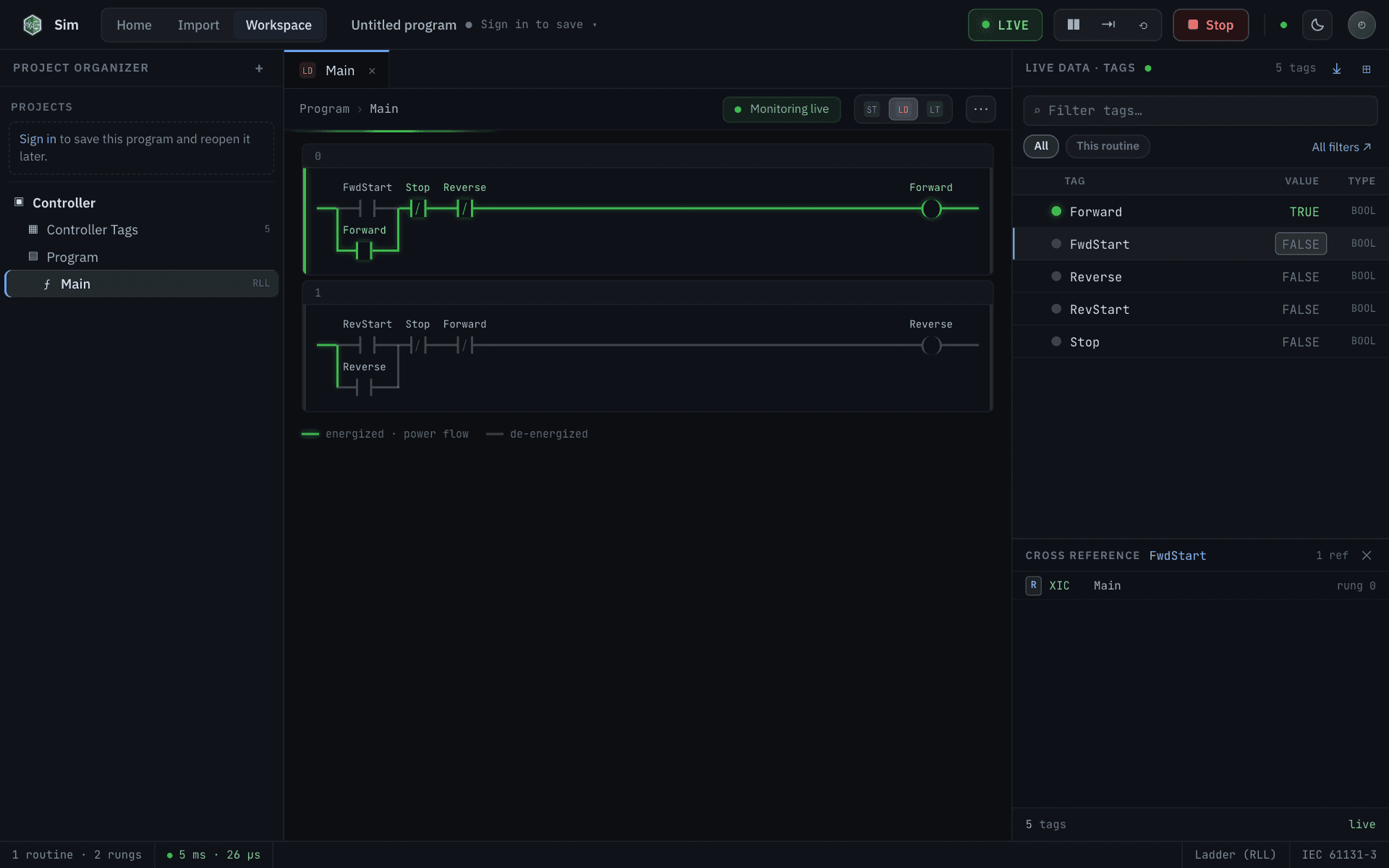
The program
[XIC(FwdStart),XIC(Forward)]XIO(Stop)XIO(Reverse)OTE(Forward);
[XIC(RevStart),XIC(Reverse)]XIO(Stop)XIO(Forward)OTE(Reverse);
How it works
Rung 0 is the forward direction. It is the motor start/stop rung with one more contact: FwdStart or the Forward seal-in contact starts the path, Stop breaks it, and XIO(Reverse) breaks it too whenever Reverse is on.
Rung 1 is the mirror image for reverse, with XIO(Forward) in series.
With the motor running forward, pressing RevStart does nothing, because rung 1 is blocked by XIO(Forward). You have to press Stop first. That drops Forward, and then RevStart can seal in.
Press both start buttons together from a stop and Forward wins. Rung 0 is solved first and turns Forward on, so by the time rung 1 is solved its XIO(Forward) is already open. Swap the rungs and Reverse wins instead.
On a real starter the interlock is repeated in hardware, with auxiliary contacts on the contactors and usually a mechanical interlock between them. The PLC logic works alongside those and never replaces them.
Try this
In the simulator, an input changes when you click it in the tag list: click once to turn it on and again to turn it off. To press a button, turn it on; to release it, turn it off; to pulse it, do both.
- Press FwdStart. Forward seals in. Now press RevStart: nothing changes.
- Press Stop, then RevStart. Reverse seals in.
- Stop the motor, then turn FwdStart and RevStart on together. Forward wins. Swap the two rungs and try again.
Tags
| TAG | ROLE |
|---|---|
| FwdStart, RevStart | BOOL inputs. Momentary start buttons. |
| Stop | BOOL input. 1 while pressed. |
| Forward, Reverse | BOOL outputs. The two contactors. |
More examples
Motor start/stop
Ladder (NT)A latching start/stop station. Click Start once and the seal-in branch holds the motor on through its own contact until Stop breaks the rung.
One-shot toggle
Ladder (NT)One button turns a lamp on, and the same button turns it off. A one-shot makes each press count exactly once, however long you hold it.
Read more about the ladder logic simulator, or see all examples.